Quote sent. Then what?

Prepare your quote in minutes and send it as a PDF or link. Tekliva tells you when your customer opens it, asks your team at the right moment and updates the follow-up board from the answer. Nobody fills in a spreadsheet.

Live example
ItemQtyAmount
Search a product to add a line
Total excl. VAT€0
Create PDF and link

Writing quotes is easy. Following up is not.

Most teams are good at preparing quotes. The trouble starts afterwards: the quote goes out by WhatsApp or email, someone acts if the customer calls back, and it is forgotten if they don't. Status lives in a spreadsheet from the weekly meeting, and it is out of date by Wednesday.

  • ReactiveIf the customer doesn't call back, nobody calls them. The quote quietly disappears.
  • ScatteredStatus lives in people's heads, in chats and in separate sheets.
  • StaleThe sheet updated on Monday is wrong by Wednesday.

How it works

Three steps. Tekliva handles two of them.

  1. Save or import your quote

    Quotes from your quoting tool land in the list with their value and line items. Adding one by hand takes a minute, and the number is assigned automatically.

  2. Tekliva asks when it's time

    Once the number of days your manager set has passed, it asks the person who wrote the quote where it stands. One tap to answer, and the pipeline updates itself.

  3. Monday's summary is ready

    What warmed up this week, what went unanswered, what passed 30 days and where you are against goals, in your inbox and on screen before the meeting.

What your quote looks like

Your template, your look

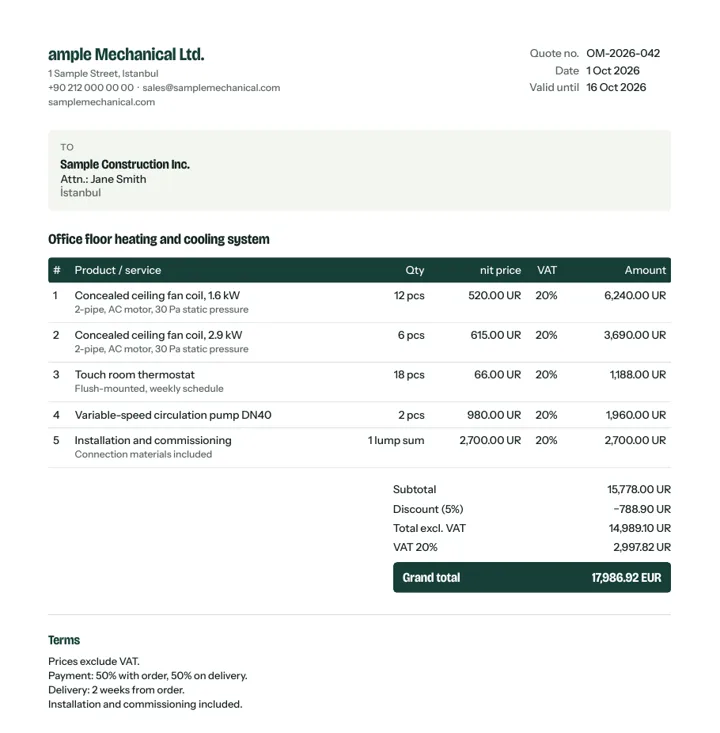
You choose where the logo sits, the colours, the columns and which sections appear. Save several templates and pick one for each quote.

  • Logo left, centred or right; your brand colour in the headings
  • Turn columns on or off: unit price, discount, VAT, description
  • Summary page, bank details, signature and stamp area
  • Download a PDF or send a link that tells you when it's opened
View a sample quote (PDF): Classic
This sample was made with the free quote generator on this site.

Your price list isn't in the system?

Upload your Excel price list yourself and prices fill in as you type a product code. Rather not bother? Send us your list and we'll add it to your account within 2 business days.

Upload my listSend my listYour list is used only in your account and never shared.

A quote list that stays clean and searchable

Number, date, company, value and owner. Brands and categories come from pick lists, so the reports add up.

Example quote list
NoDateProjectCompanyValueStatus
104222 SepHarbour Plaza 4th floor officeDeniz Architects₺480,000Hot
104122 SepNorth Depot lightingNorth Logistics₺220,000Hot
104021 SepAtlas Factory chillerAtlas Foods₺2,400,000Warm
103919 SepPark Residence fan coilsPark Construction₺860,000Cold
103818 SepAda Clinic air conditioningAda Health₺1,100,000Won

The summary is ready before the meeting

On Monday morning the team walks in knowing what to discuss.

Monday summary, week of 21 September
Warmed up this week
4 quotes
₺3.1M
No reply for 7+ days
9 quotes
₺5.4M
Older than 30 days
6 quotes
₺2.2M
Won
3 quotes
₺1.9M
September revenue goal64%

What a sales team needs, and nothing extra

Every feature exists to do one job well: find out what happened to the quote.

Quote list

Automatic quote numbers, revision history and pick lists for brands and categories. The same brand never gets entered three different ways.

Hot, warm, cold pipeline

Open quotes sit in lanes by temperature. Drag a card, or let the answer to a follow-up question move it.

Automatic follow-up questions

Managers decide after how many days, to whom and on which channel. In-app and email are ready, WhatsApp is next.

Monday summary

A ready report for the weekly sales meeting: warming up, unanswered, waiting and progress against each person's goal.

Company timeline

Company, contacts, quotes, notes and orders on one timeline. It warns you when there has been no contact for a while and works out active or inactive status itself.

Tasks

Open a task on a company or quote, assign it, set a due date. Answering "ask me later" creates the task for you.

See all features

Founding membership · closes 31 December 2026

Join now and stay a founding member for good.

  • Every feature open until the end of the year
  • Starter plan free for good for founding members
  • No credit card, no commitment
–days