Free quote generator

The free quote generator lets you create a quote in the browser without signing up and download it as a PDF. Logo, line items, discounts and tax are built in, so you don't need an Excel or Word template.

Create a price quote online in minutes and download it as a PDF. No sign-up, no credit card, nothing to install. We calculate VAT, discounts and totals for you.

How to write a price quote

  1. Add your company and customerAdd your logo, contact and tax details. They stay in your browser, so you do not retype them next time.
  2. Add the line itemsEnter products or services with quantity and unit price. VAT, discounts and the grand total are calculated instantly.
  3. Download and send the PDFYour quote downloads as a clean PDF with your logo. Send it to your customer by email or WhatsApp.
  • No sign-up
  • Nothing stored on our servers
  • Branded PDF in seconds
Your company
Logo (PNG or JPG, up to 500 KB)
Customer

Quote details

Line items
The catalog has no prices; you enter your own.
+17 brands

Your brand isn't listed? Tell us its name and we'll add its product list to the catalog.

  1. AmountUS$0.00
Terms and notes
Grand totalUS$0.00

Let's add your brand to the catalog

Leave the brand name and your email; we'll prepare the list and get back to you.

Sample quotes

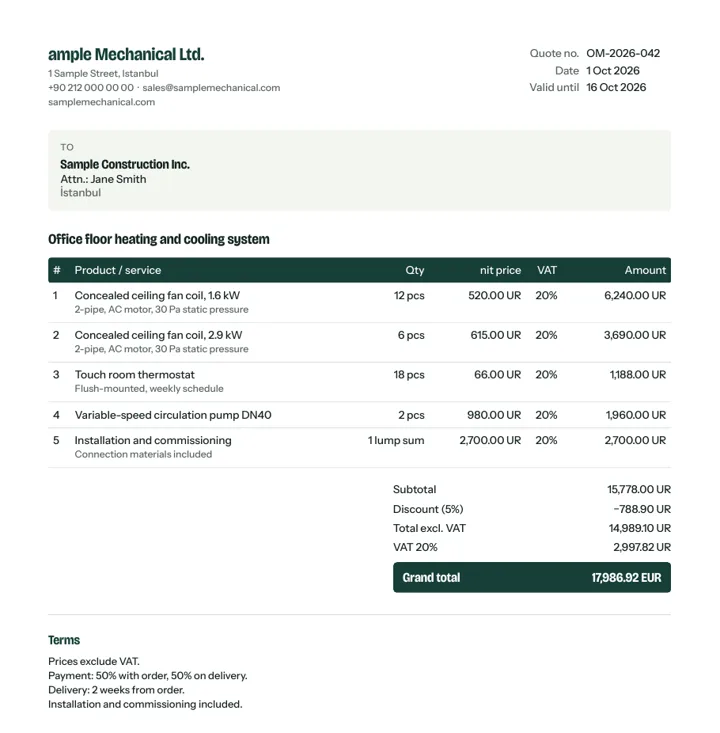
Open the sample PDFs made with this free quote generator, then fill in the one that fits your job. Below are the line items of three common quote types; add the same products from the catalog and type in your prices.

Air conditioning / VRF quote

Office 4th floor, VRF system with 6 indoor units

  • 1 × Daikin VRV outdoor unit RXYSQ6TV1
  • 6 × Daikin cassette indoor unit FXZQ25A
  • 1 lump sum copper piping, drainage and installation
  • Not included: core drilling, electrical supply
Boiler quote

Detached house, condensing boiler replacement

  • 1 × Buderus Logamax plus GB172i
  • 1 × RC310 room controller
  • 1 lump sum removal and disposal of old boiler
  • Valid for 30 days, prices exclude VAT

Pump quote

Apartment block heating circulator replacement

  • 2 × Wilo Yonos MAXO 40/0.5-8
  • 2 hours installation and commissioning
  • Warranty: 2 years
  • Delivery: 1 week after order
Open sample PDF: Classic
This sample was made with the free quote generator on this site.

Quick guide: a quote customers say yes to

Keep these five points in mind while you fill in the form and your quote will be accurate and approved faster.

  1. Write a clear subject

    Instead of “AC quote”, write “4th floor office, VRF system with 6 indoor units”. Your customer finds it instantly, even months later.

  2. List items with brand and model

    Products added from the catalog come with brand and model code. Fewer “is this equivalent?” questions and an easier comparison.

  3. Show tax clearly

    Say whether prices include VAT or sales tax and set the right rate on each line. Totals are calculated for you.

  4. Set a validity period

    Material prices and exchange rates move. A validity of 14–30 days protects you from orders at outdated prices.

  5. Spell out payment and delivery

    Deposit, payment terms, lead time and what's excluded (installation, shipping, labour) in writing prevent disputes later.

Customize your quote in the panel

The PDF on this page uses a standard layout. If the logo size, colors or columns don't suit you, the template editor in the Tekliva panel lets you adjust all of it.

  • Logo size and alignmentSmall, medium, large or automatic company logo; aligned left, center or right.
  • Brand logosShow or hide the logos of the brands in your quote and size them separately from your own logo.
  • Dealer logoUpload the logo of the brand you are an authorized dealer for.
  • ColorsBrand colors on single-brand quotes, or an accent color of your choice.
  • Title and font sizeA document title such as “PRICE QUOTE”; small, medium or large text.
  • ColumnsLine no, unit price, VAT, discount and up to 6 technical columns (capacity, flow and more).
  • Visible detailsTurn tax details, contact person, customer address, validity and author on or off.
  • Intro and termsA short intro before the table, then payment and delivery terms.
  • Totals and summary pageFull breakdown or net total only; a summary page for long quotes.
  • Bank details and signatureIBAN, closing text, signature and a stamp box for customer approval.
  • Footer and brand stripA footer note on every page, a logo strip of the brands you sell, page numbers.
  • Extra pagesAdd about us, references, certificates and scope pages to the end of the quote.

Create a free account and set up your template →

FAQ

Is it really free?

Yes. Create and download as many quotes as you like without signing up.

Where does my data go?

Nowhere permanent. Your details are sent to our server only to build the PDF, the PDF is returned to you and nothing is stored. The form content stays in your own browser.

How is this better than an Excel or Word template?

No broken formulas, alignment or VAT maths. Totals are always right and every quote looks consistent.

Can I save and track my quotes?

This page only creates PDFs. To save, number, send as a link and follow up your quotes, open a free Tekliva account.

Is there free quoting software?

Yes, this page. It runs in your browser with no install or sign-up. Add your logo and line items and download a PDF with VAT and totals calculated.

What should a quote include?

A title and quote number, your company and customer details, line items with quantity, unit and unit price, discounts and VAT, totals, what is included and excluded, payment and delivery terms and a validity date. This generator covers all of them.

Do I need to download a quote template?

No. Instead of downloading a Word or Excel template, fill in the form; the layout, calculations and PDF are done for you.

How do I make a quote online?

On this page, enter your company and your customer, add products from the catalog or type your own line items, then set quantity and unit price. VAT, discounts and totals are calculated instantly; download the PDF and send it by email or WhatsApp. No sign-up needed.

What is the difference between a quote and an estimate?

A quote is a fixed price for a defined scope, usually valid for a set number of days. An estimate is an approximate cost that can change. Use this generator for quotes; add a validity period and list what is not included.

How do I know if my quote was opened?

You can't tell when you email a PDF. If you send the quote as a link from a Tekliva account, you get notified when the customer opens it and reminded when it is time to follow up.

Quote tracking software →

Founding membership · closes 31 December 2026

Join now and stay a founding member for good.

  • Every feature open until the end of the year
  • Starter plan free for good for founding members
  • No credit card, no commitment
–days